Answer incoming calls
Your agent picks up calls to your Twilio number, or calls routed through an Exotel inbound webhook, using your instructions and documents.
Inbound and outbound AI calling
Answer and make calls in a natural voice, using your own documents, with a human handoff when needed.
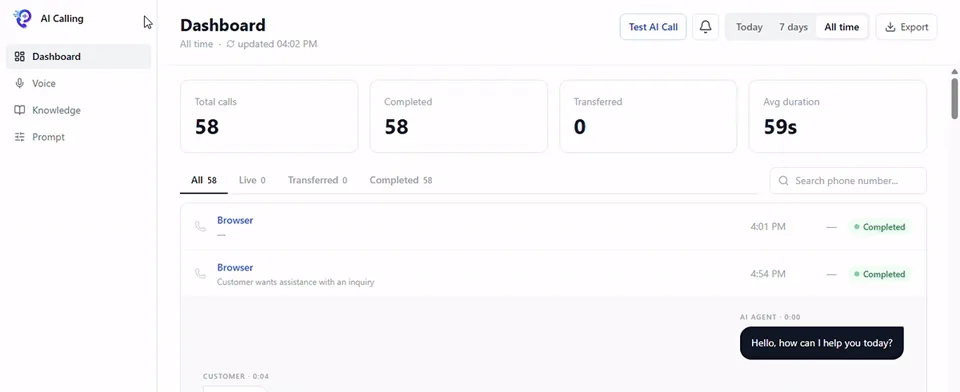
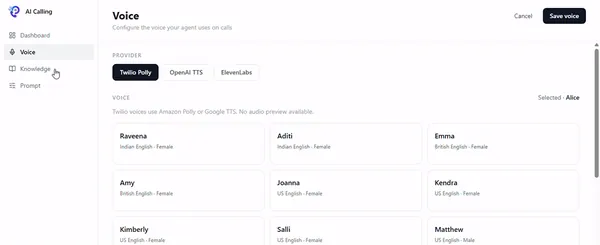
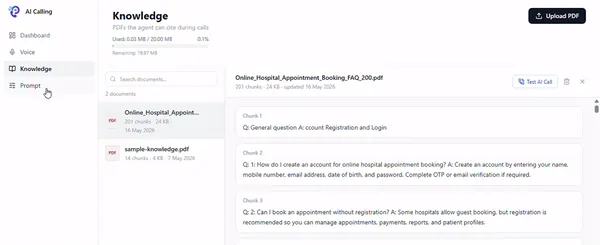
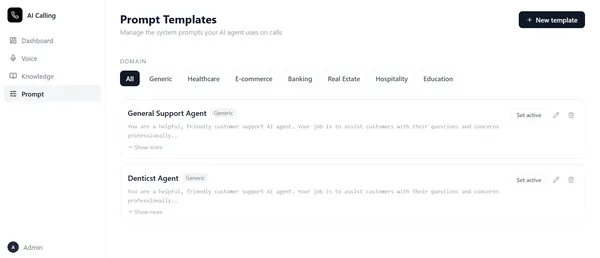
A recording of the real product: the call dashboard, a call transcript, a test call from the browser, voice settings, knowledge documents and prompt templates.
 Twilio
 Exotel
 OpenAI
 ElevenLabs
 Amazon Polly
 Google
How it works
From the moment the phone rings to the record in your dashboard.
A customer calls your Twilio or Exotel number, or your agent places an outbound call.
The caller’s words are transcribed as they speak. Real-time OpenAI voice streaming runs on Twilio.
Set the agent’s role, tone and topics once, and it follows them on every call.
Answers come from the PDFs you upload, and the agent tells the caller when something isn’t covered.
The agent replies in the voice you picked, or transfers the call to someone on your team.
Status, transcript, summary, intent and sentiment are saved to your call history.
The workspace
Everything you need to run an AI phone agent, in one place.
Want to see it working with your own calls?
Book a demo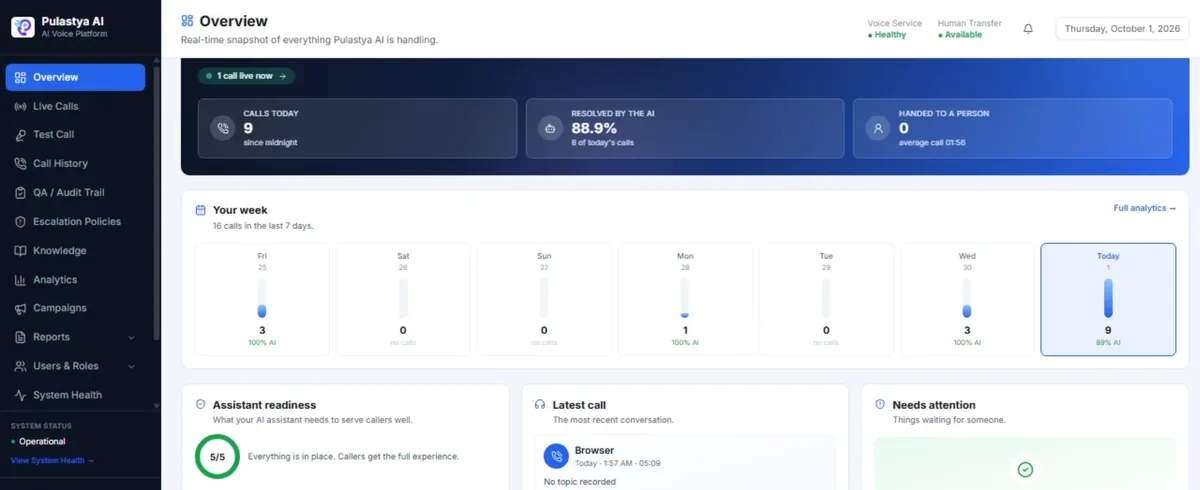
Give your agent a voice, documents to learn from and instructions to follow. Test it from your browser, then follow every call from the dashboard.
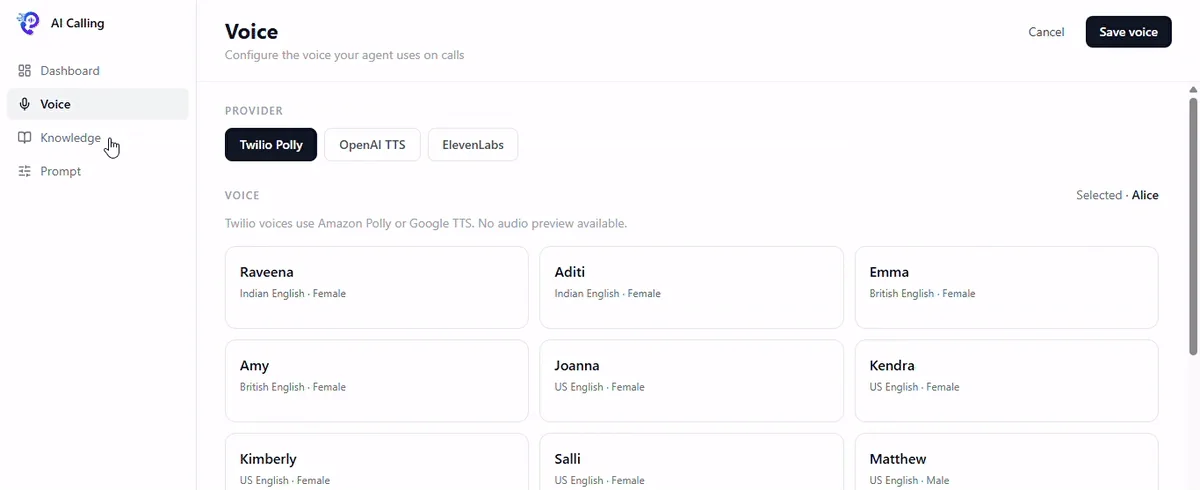
Choose a voice provider and a voice, and connect the phone number your agent uses.
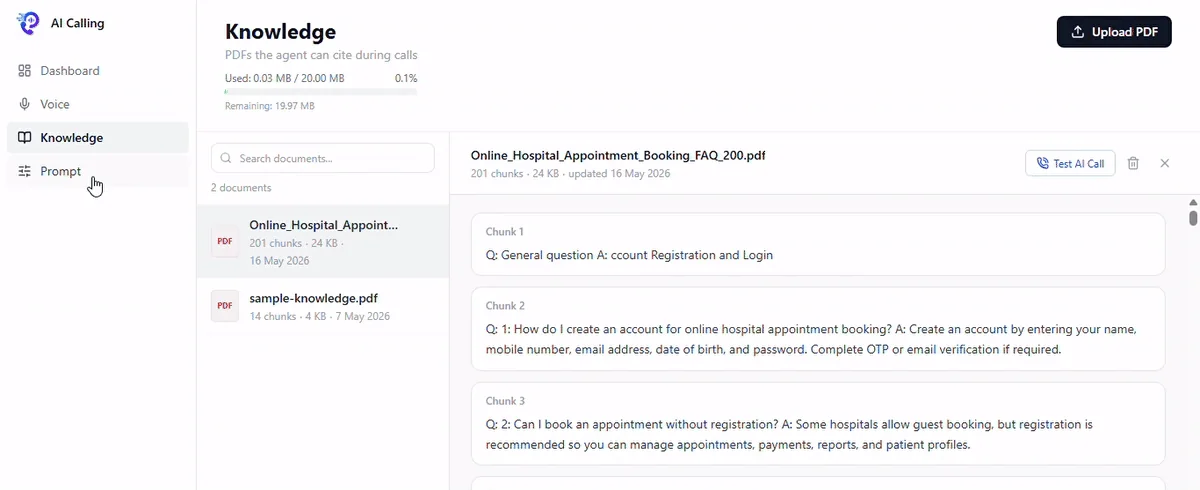
Upload your FAQs, policies and service guides. The agent answers callers from them, so it sticks to the information you give it.
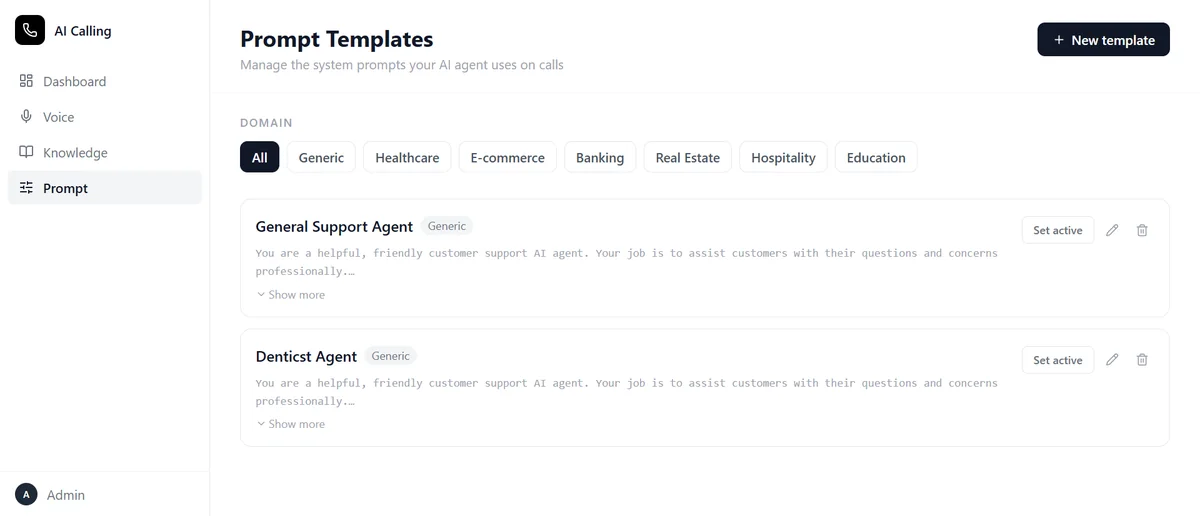
A prompt template is the set of instructions your agent follows on every call: its role, what it can help with and how it speaks.
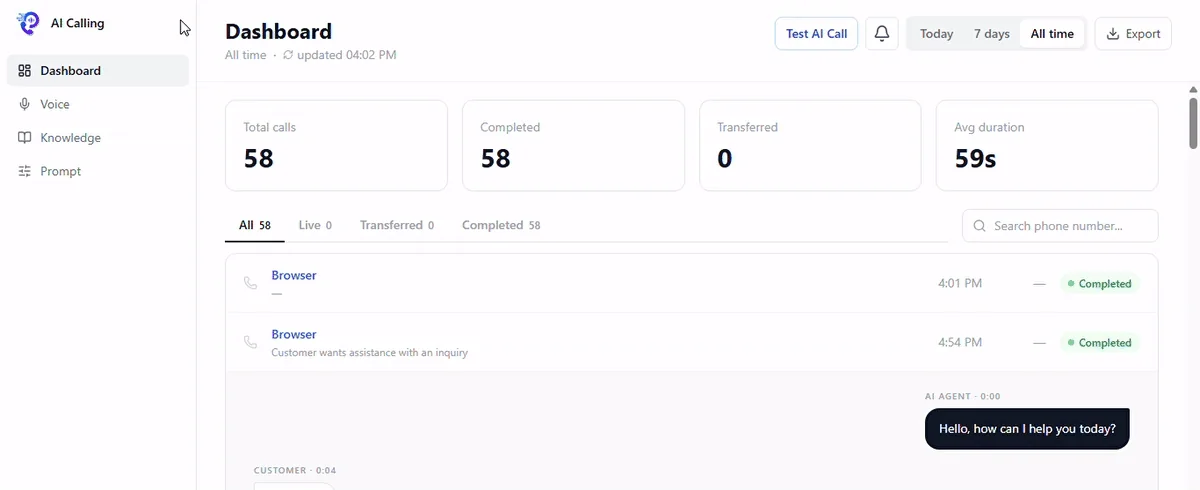
The dashboard lists every call with its status, so you always know what’s live, finished or with your team.
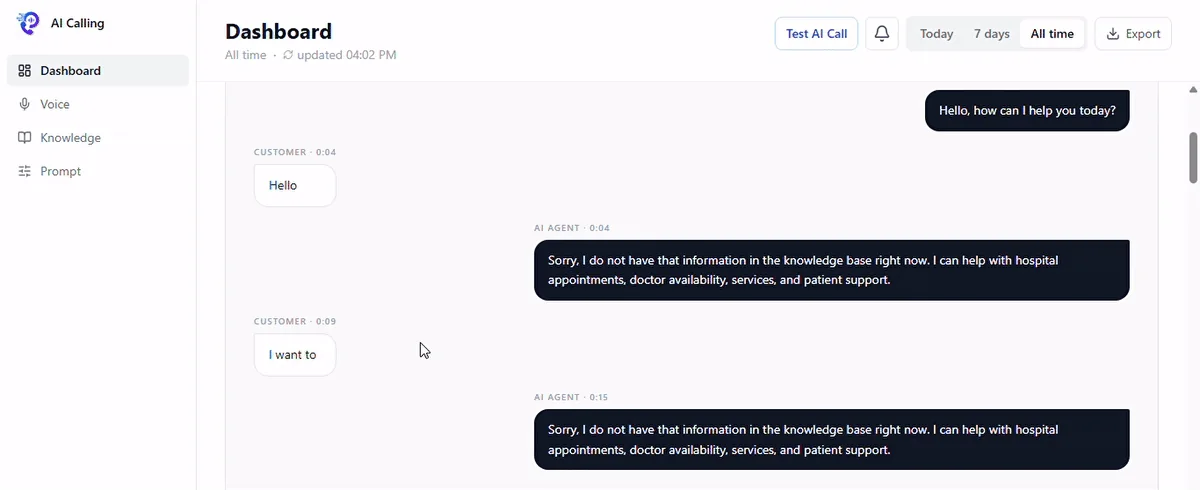
Open any call to read the conversation between the caller and the agent, turn by turn.
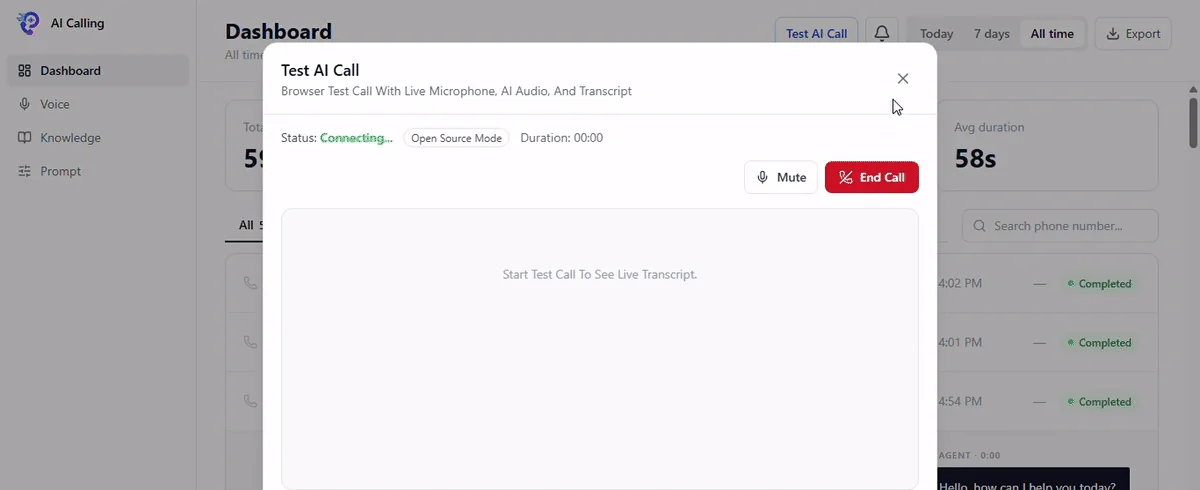
Talk to your agent from the browser and hear exactly how it sounds before it takes real calls.
When a caller needs a human, the agent transfers the call. It’s marked as transferred, so your team can pick it up with the full context.
Inbound and outbound
Set your agent up once and use it for the calls you receive and the calls you make.
Your agent picks up calls to your Twilio number, or calls routed through an Exotel inbound webhook, using your instructions and documents.
Your agent places calls through Twilio, or through Exotel using outbound connect and connect-to-flow.
Call your agent from the browser, hear its replies and read the live transcript, or check its answers by text in Test AI Chat.
Industries
Each industry comes with a starter prompt. Add your own documents, adjust the instructions and your agent is ready to test.
Talk to us about your use case
Let the agent handle routine questions from your help documents and pass complex issues to your support team.

Answer questions about appointments, doctors and services from your clinic FAQs, and hand over to staff when a patient needs a person.

Give shoppers answers from your policies and product documents, and send anything else to your team.

Answer routine service questions, review every transcript afterwards and transfer sensitive requests to your staff.

Answer callers from your listings and process documents, and connect interested buyers with an agent on your team.

Answer questions about bookings, rooms, check-in and check-out, amenities and reservations, day or night.

Answer callers from your course documents and hand them to your admissions team when they need more help.
Example calls
Illustrative examples of how an agent set up in Pulastya handles common calls. They are not real customer calls or results.
Can I book an appointment without registering first?
Registration is needed before booking. I can explain how to create an account using the steps in our hospital FAQ.
I'd like to change my reservation dates for next week.
I can connect you with our reservations team to update your booking. Please hold for a moment.
Do you offer a discount for yearly contracts?
I don't have that information in the knowledge base right now. I can transfer you to someone who can help.
Integrations
Calls run on Twilio or Exotel, the agent runs on OpenAI, and voices come from ElevenLabs, Amazon Polly, Google or OpenAI. You connect your own accounts.
See integration docsSecurity and control
How Pulastya protects your credentials and keeps access in the right hands.
You bring your own Twilio or Exotel and OpenAI credentials. They’re stored encrypted and masked in the workspace.
Pulastya verifies your Twilio and OpenAI credentials, and the calling console stays locked until they’re saved.
Give each person the right level of access: user, manager, admin or super admin. Only super admins can change roles.
Admins see audit logs, calls, payments, notifications and document uploads in one place.
Pricing
Pricing depends on your use case and call volume. Tell us what you need and we’ll share pricing and deployment options.
Custom pricing on request
What's included
Custom pricing on request
Everything in Starter, plus
Custom
What's included
Every plan runs on your own Twilio or Exotel account and your own OpenAI API key. Our team usually replies within one business day.
For developers
The Pulastya API links your calls to the rest of your business. Common uses:
FAQ
Quick answers about how Pulastya works. Have another question? Email support.
Pulastya AI is a platform for building AI voice agents that answer and make phone calls for your business. You choose the voice, upload your documents, set the instructions, test the agent in your browser and follow every call from one dashboard.
Twilio is the default. Exotel is supported for standard call flows: outbound connect, connect-to-flow, inbound webhook, status callbacks and transfers. Real-time OpenAI voice streaming currently runs on Twilio only.
Yes. Pulastya works with your own accounts: you add your Twilio or Exotel credentials and your OpenAI API key. They are stored encrypted and masked in the workspace.
In two ways. A prompt template sets its role and how it behaves, and you can start from a ready-made one for your industry. The PDFs you upload to Knowledge give it the facts it answers from.
Yes. The agent can transfer a call to your team. Transferred calls get their own status, filter and count on the dashboard.
Yes. Start a test call in your browser to talk to the agent with your microphone and see a live transcript, or check its answers by text in Test AI Chat.
Each call appears in your call history with its status and full transcript, plus a summary, the caller’s intent and their sentiment. You can also export the call list.
You can use Twilio Polly voices (Amazon Polly or Google TTS), OpenAI TTS or ElevenLabs, including Indian, British and US English voices.
Pricing depends on your use case and call volume. Contact our team and we will share pricing and deployment options.
Book a demo and we’ll walk you through setting up your agent, connecting your phone number and making your first test call.